

Note: To jump the product download links, click here.
It’s clear that AI is going to do a lot of destroying — of jobs, of the economy when overvalued companies lose markets, of attempts by humans to correct wealth inequality, of our ability to interact with humans at companies determined to cut costs, of most people’s ability to deal with government at all — in short, of happiness on all too grand a scale.
Yet there’s a bright side for us that people like Altman and Zuckerberg haven’t considered: AI eats what it’s fed regardless of source. AI is now eating Adobe. And that’s just the start.
Adobe’s Predatory Model
Like most software companies of any great size these days, Adobe products now runs on a subscription model, meaning you don’t buy its products, you rent them. Calling it a subscription is polite. You subscribe to a magazine. You purchase a car. It’s a subscription in the same sense that paying to cross a bridge is a “subscription.” It’s rent, pure and simple, and predatory rent at that.
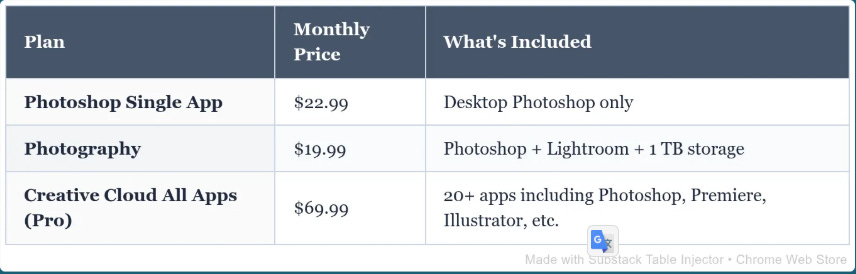
Adobe Photoshop is $22.99/month as a standalone subscription, or $19.99/month as part of the Photography plan, which also includes Lightroom and 1 TB of cloud storage. There’s also a “Creative Cloud” plan for a smart $70 per month before discounts.
The last version of Photoshop you could actually own — as in “pay for once and use” — was released in 2012. The last version of Acrobat you could perpetually own was released in 2020. Its end-of-life was last year.
We’ve discussed this before, the transition from purchase to rent. See “The Licensing Revolution: Is Resistance Futile?” and “The Licensing Revolution: Windows Edition”. Yet one more way the rich become richer still. It’s the song of our times.
AI the Disruptor
Now comes AI the Disruptor. AI allows Adobe and firms like it to create and update their products considerably faster than using human labor alone. For them, AI is gold; it’s cash in the bank.
Unfortunately for Adobe, AI can hurt them as well. A software engineer named Brandon Thomas has cloned Adobe’s Creative Suite. Not copied and pasted the code, but totally replicated it with no stolen parts. He used AI to do almost all of the work. He started on September 30, and one week later he had his first release. The result is now free to all who want to use it.
ArsTechnica describes it well:
“Software is over”: Bold AI developer takes aim at Adobe with open source clones
Opus-built Creative Cloud alternatives are ambitious, free, and nowhere near finished.
For a while, those hoping to avoid the difficulty and expense of dealing with Adobe’s Creative Suite have been able to use several free and/or open source alternatives that replicate some or all of those capabilities. Now, one developer is using AI-powered reverse engineering to mimic the look, feel, and functionality of Adobe’s well-known software with what he hopes will soon be perfect fidelity.
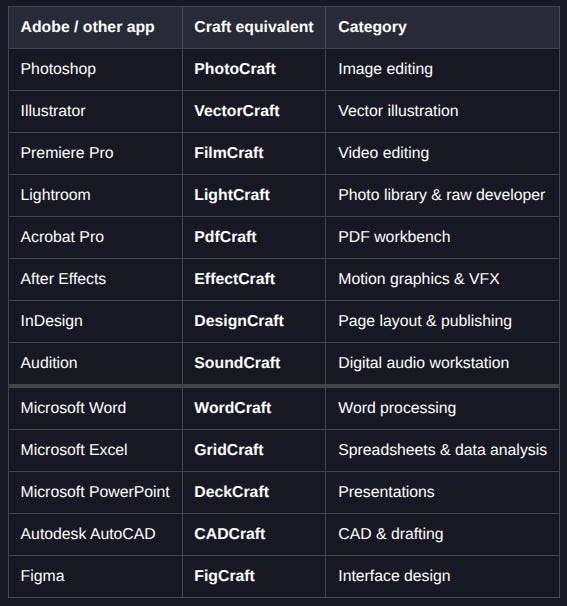
ArtCraft got its start last year as a “controllable AI for artists” that allows for precise post-generation editing of AI-crafted images and videos. Over the weekend, though, the brand debuted its pivot to a suite of seven open source apps recreating the user interface and tools found in Adobe’s Photoshop, Illustrator, Premiere, Lightroom, After Effects, InDesign, and Acrobat Pro.
In announcing those new apps on Reddit earlier this week, software developer Brandon Thomas said he used Anthropic’s Claude Opus 5.5 to create “clean-room replacements” for Adobe’s closed source software in Rust (with WebAssembly versions available for use in a browser). And while commenters on Hacker News and elsewhere have taken pains to point out the new software’s many current shortcomings, Thomas makes the grandiose promise that the current “super early alpha” state will soon lead to something just as functional as anything Adobe has ever put out.
“We’re going to reach 100% [feature] parity within a month,” Thomas stated on Reddit of his plans to quickly squash bugs and add features with the help of community reports. Days later, on Hacker News, he amended that position slightly to say that “99% parity will take a while, but I’m sure it’ll be measured in months and not years.”
Your takeaway: Every proprietary piece of commercial software can be cloned with AI and given away for free. Everything, from Windows 11 or 12 to TurboTax to you name it. If it runs offline, you can make it and use it for free.
This is a revolution. Thomas’s team has already added Windows products to the replicated list (see below). Get ready for more.
‘Break Things and Move On’
The days when those who rule us are untouched by the “break things and move on” mentality are now gone. To quote ArsTechnica above: “Software is over,” a fitting end to the predatory corporations that thought they could stay on top by shearing the masses forever. Using AI, the masses can now shear back.
Have no doubt; this is truly a revolt. Now that one person has done it, many will follow. The monster that software bros have unleashed on us all has been used against its creator. You might want to order your popcorn ahead of the crowd. This is just the start.
For more on this story, watch this video: “Adobe Charged Him to Cancel. So He Rebuilt Adobe.” It covers a lot of bases.
Download Crafting Apps
The software released by Brandon Thomas and his team now includes 13 products, eight from Adobe, three from Microsoft, and one each from Autodesk and Figma.
A note about naming: As of this date, ArtCraft is (or was) the name of the team, the overall project, and a standalone product called ArtCraft, an AI studio app that isn’t a clone. It’s very confusing. To make sure you get to the right place, follow the links below.
If You Want Access to Them All
To install a dashboard that allows you to access all Crafting App projects, download the Launcher for your operating system. Here are the main Windows installers:
To see all current builds — Windows, Mac and Linux — click here, scroll to the Assets section and choose your version. They’re in order by OS — Linux, MacOS, Windows.
[Updated: The Launcher doesn’t install all apps. It gives you Dashboard access to all apps. Install and update only the apps you want. Nice!]
If You Want to Install Just One App
Though I recommend using the dashboard (above), every Crafting App can be installed as a standalone. Each has its own Windows, MacOS and Linux installers. Just pick the app you need after clicking the link below.
If you install one or more of these apps, tell me about your experience. I’ll be using them myself.
Richly deserved. I've never hated software the way I hate Adobe.
Years ago, they exposed the password I used for everything. It's bloatware that bleats upsell advertising at you constantly. It's like a virus that hides everywhere in your computer if you try to remove it.
It's not even a good standard format.
I've switched to Foxit and am ending all our Adobe subscriptions as a corporate policy soon.
After checking out these apps for a few weeks to follow the development, I've spent the last few days adjusting my own logos and doing some typography projects with the vector app. Very impressive. I left Adobe in the spring of 2025, bought the Affinity suite (and also use the free version), but love having the option to use my Linux machine. There's a huge gap for Linux users when it comes to modern UI creative apps.
I've found very few problems with the vector app so far. The Lightroom alternative has a lot more problems especially with exposure control and they need to explain more about how to get AI models for the denoise and masking but I'll keep looking at new versions. I look forward to testing Photocraft and Designcraft (or whatever they called the InDesign alternative) a bit more. For now I use Affinity on my Mac for all professional work but will definitely keep an eye on these.